

I built Transient with AI
to study music arrangement
CLIENT
Self-exploration
ROLE
AI Product Builder
TEAM
Design: Rhiddhit Paul
Dev: Rhiddhit Paul
PM: Rhiddhit Paul
YEAR
2026
WHY BUILD IT?
Make-shift methods for taking notes in tracks existed. But they didn't provide the flexibility needed to really study music arrangement.
As a music producer and DJ, understanding why I like a track matters as much as listening to it. I wanted to mark standout sections while listening and revisit those notes later for inspiration.
The usual approach was messy — listening on one device, scribbling in a notebook or notes app, losing the thread by the time I sat down to write music. Other producers hit the same wall and jury-rigged notes inside their DAW or DJ software, since nothing built for this existed. But if we can build our own tools, why compromise?
SIDE NOTE
This was more than a design project for me. It was a revelation.
Since 2019, I'd been working toward becoming a designer + developer — learning CSS, HTML, Python, JavaScript, despite an Architecture background. Then Claude Code changed everything.
When the idea for Transient came around, I knew it was the project to push me through the friction of a new workflow with new tools. Designed in Claude Code and GPT-5.5, built on Electron with React for macOS and Windows, with a Javascript backend, Transient wasn't just a prototype — it was a product I built from scratch, tested, and shipped. An adventure.
THE GOAL
Take notes on tracks that I enjoy
+
Develop an AI workflow that
I can reuse to solve other problems too
PHASE 1
Sketch to Prototype
I started with a simple paper sketch with the basic jobs-to-be-done listed.

Then I moved into Claude explaining what I needed, who it was for, and how it would function.
I only explained the music analysis flow at this stage, and not the addition of notes. Claude code works best when you provide scoped out challenges, rather than asking it to build everything in one go.

This prompt was only the starting point. The actual build needed a lot of debugging.
Usually a prototype takes a few minutes, sometime a few hours — but this time the backend was genuinely complex. Analyzing music was not a simple task, and involved many subtasks. Uploading a song, identifying beats in the form of transients, calculating the BPM, and chord changes, and rendering the beat markers was a lot to figure out. I started with a Python library called Librosa for analysis and built the shell around it in Electron.

I spent 2 days debugging the MVP
After lots of reading through Stack Overflow, I managed to get the MVP functional. I also added the ability to mark notes at different parts of the song.

A functional MVP 3 days since starting
PHASE 2
Visual Explorations
Feelings + Function
What if I made it feel like an analog synthesizer?
While the product worked – it could take a track, analyze it, and allow me to add notes, I wanted it to push the boundaries on how it felt to use. I took inspiration from synthesizers like the Moog and Teenage Engineering. I wondered if I could merge the functionality of my product, with the physical style of these synthesizers.
I tried this with Claude Code, Figma Make, Gemini and finally ChatGPT.

Taking inspiration from Moog
Failing Fast
It soon became evident that Claude and Figma Make weren't the tools for the job.
Claude only changed the aesthetic of the sticky notes when provided with the inspiration image. Exploring visually while also building a functional product was not something Claude was particularly good at.
Figma Make completely disregarded the structure of the Claude MVP and decided to build its own product from scratch. I was also not very confident in Figma Makes ability to handle complex backends processes, so I decided to move on.

Claude failed to impress

Figma Make was even worse
chatgpt to the rescue
ChatGPT impressed despite hallucinations.
I was not concerned with the technical feasibility of what ChatGPT created.
The aesthetic direction was what I was after.

Initial Prompts provided to ChatGPT

After a few iterations with GPT 5.5
PHASE 3
Rebuilding the UI
The NEW Challenge
Claude was not great with handling image data.
Directly referencing an image would not work.
So, I came up with a new process to translate the reference to the built code.
1
GPT 5.5
Build a visual asset library from the reference image using GPT 5.5
2
FIGMA
Refine visual asset library in Figma, and extract assets to folders with naming
3
FIGMA
Build a structural diagram of the sections in Figma for Claude to reference
4
CLAUDE
Build one section at a time, using the wireframe reference and the visual assets in folders
Feelings + Function
Extracting the reference image as visual assets
While the product worked (it could take a track, analyze it, and allow me to add notes) I wanted it to push the boundaries on how it felt to use. I took inspiration from synthesizers like the Moog and Teenage Engineering. I wondered if I could merge the functionality of my product, with the physical style of these synthesizers.
I tried this with Claude Code, Figma Make, Gemini and finally ChatGPT.

Visual Assets generated in GPT 5.5

Visual Assets extracted in Figma
Failing Fast
Providing Claude a simplified structure in Figma
In order to help Claude understand how and where to apply the referenced visual assets, I built a simple diagram in Figma that Claude could refer to and learn from. This also helped reference different sections while building.

Figma Scaffolding for Claude
Failing Fast
Building section by section, while maintaining proper versioning in Github
Since I was using the $20 plan for Claude Code, I worked only with Sonnet 4.5. This meant that I had to manage the context provided to Claude in order to get good quality results. Building section by section helped to bring out the best results without wasting tokens in re-prompting. I maintained a version history in Github so that in case Claude messed up a previously fixed section, while building a new one, I could easily revert the changes.

Built Waveform Minimap

Built Note Rows
The Product is Lovable
After spending a few days building each section, and debugging issues, the minimum lovable product was ready.
Ready for Testing
PHASE 3
Pivoting to Javascript to improve song analysis
The FATAL FLAW
I discovered a major flaw in the backend processes just before distribution, which made the product unusable.
The python backend using Librosa worked perfectly on my own macbook. Each song took barely a few seconds to analyze. But when I tried to install the product on my friends macbook, each song took around 2 minutes. This was a disaster. No-one would wait around for 2 minutes just to use the product for the first time.
Javascript Essentia
I rebuilt the entire backend analysis algorithm using Javascript Essentia. Now, each song took just 2 seconds to analyze - down from the 2 minutes before.
How did I improve the analysis time so much? Well, that's the big secret. But, I can reveal that I asked Claude to build me a visual diagram of how data was flowing in the backend once a song was uploaded in order to determine how to create a much more efficient algorithm.

Improving song analysis time
PHASE 4
More than just music
Diving Deeper with Microscope
After the foundations were ready, I made the music analysis richer. I called it Microscope.
Music producers want to be able to load a song in and understand much more than just the music arrangement. They want to know about the history of the song, how it contributed culturally, and whether the artist has spoken about it in any interviews. For that I introduced the 'microscope' feature.
MICROSCOPE
for richer analysis
PHASE 6
Future Fixes
Testing accuracy
I tested the accuracy of the analysis algorithm against song analysis on Rekordbox, as well as song data online.
I realized that music that was more textural, with non-uniform drums, was incorrectly analyzed in Transient. However, I am currently working on training the analysis algorithm with a new ML dataset, which will lead to improved accuracy in newer versions.

Testing Transient against song data online
Mission successful
Understanding Strengths
I used different tools for different things in this project. That was the secret sauce.
I had previously relied completely on Claude Code for everything, but this project taught me to understand the strengths of each model in a workflow and use them appropriately.
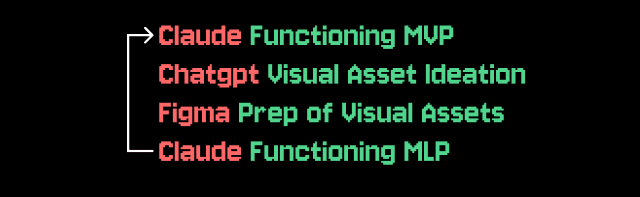
Replicable Workflow
Others found success with the workflow too!
My goal at the start had been to use this project to know when and how to switch between different models to design a product end-to-end. It ended up being a process that others found success with too, which will be the most timeless element of this project for me (until someone introduces a new model that is!)

